
Working Hours Records in Compliance Audits: What Auditors Check and Why Factories Fail
Clean punch data isn't enough. Auditors compare attendance with payroll, gate logs and output. Here's what they check, the red flags they look for, and how to keep working-hours records audit-ready
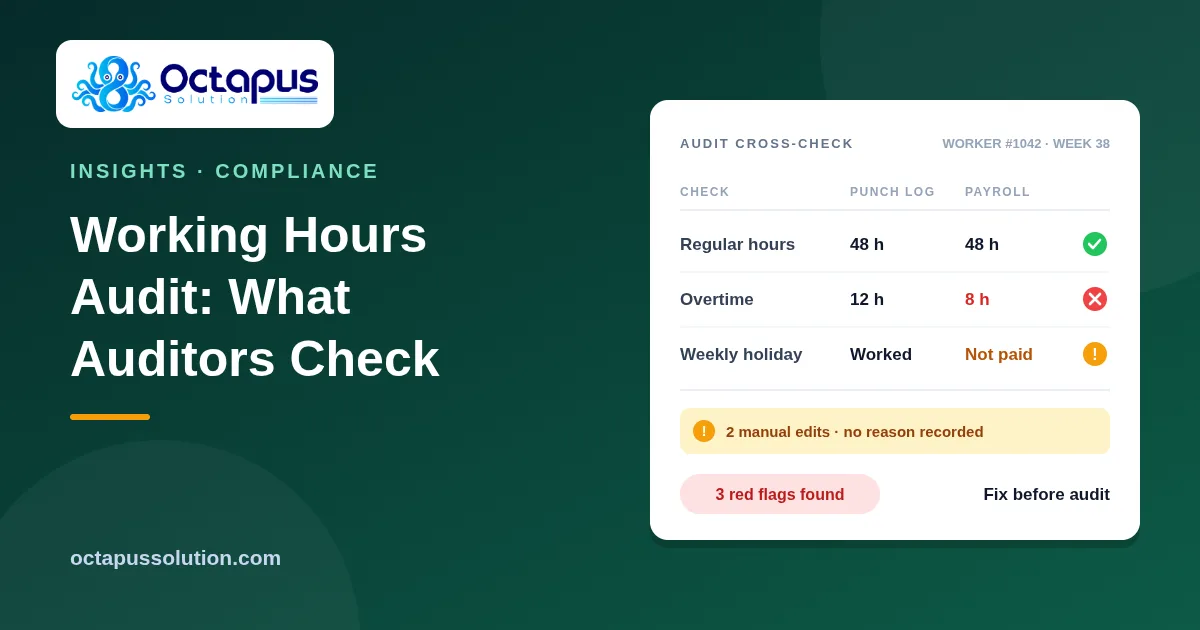
The audit was going well. Fire exits were clear, the canteen was clean, and the documents were filed in order. Then the auditor picked twenty workers at random, asked for their punch records and payslips for the last three months, and laid them side by side.
That's where the finding came from: not a missing fire extinguisher, but twelve hours of overtime in the attendance system and eight hours on the payslip.
Working hours are one of the most common reasons garment factories get findings in social compliance audits, whether the audit is amfori BSCI, WRAP, SLCP, SMETA or a buyer's own code of conduct. Usually the factory isn't hiding anything. The real problem is that records from different systems don't agree, and auditors are trained to look for exactly that.
Here's what auditors actually check, the red flags they look for, and how to keep your records consistent before anyone asks.
What auditors cross-check
Auditors rarely judge a single document on its own. They compare one record against another and look for gaps between them.
Attendance vs payroll. Total hours worked in the punch log should match the regular hours and overtime hours paid on the payslip, for the same worker in the same week.
Overtime recorded vs overtime paid. Every overtime hour in the attendance system should appear on the payslip at the correct rate. Our guide on how to calculate overtime for garment workers in Bangladesh explains the formula auditors use to check this.
Hours vs legal and buyer limits. Auditors check daily and weekly hours against the Bangladesh Labour Act and the buyer's code. Under the Act, the normal working day is 8 hours, and with overtime a worker shouldn't exceed 10 hours in a day or 60 hours in a week. Many buyer codes set their own limits on top of that. Check the current law and each buyer's requirements, because the stricter rule is the one you'll be audited against.
Weekly holiday. Each worker should get their weekly holiday. If someone works on a holiday, the record should show it and the payslip should show the matching payment or a compensatory day off.
Attendance vs other evidence. Experienced auditors also compare punch data with gate logs, production output, canteen records, CCTV timestamps and worker interviews. If a line produced 3,000 pieces on a Friday but the attendance system shows nobody working, that's a finding.
Red flags auditors look for
Identical punch times. Fifty workers all punching in at exactly 08:00:00 and out at exactly 17:00:00 looks like records typed in or edited, not real biometric punches. Real punch data is messy: 07:52, 07:58, 08:03.
Overtime recorded but not paid, or the reverse. Both are problems. Unpaid overtime is a wage violation. Paid overtime that doesn't appear in attendance suggests the attendance records aren't complete.
Missing weekly holidays. Workers recorded on duty for 14 or more days in a row with no holiday in between.
Manual edits with no explanation. Punches added, deleted or changed by hand with no record of who changed them, when, or why.
Gaps when a device was offline. A device that didn't sync for three days, followed by a batch of neat, round-number punches typed in afterwards.
Two sets of records. If interviews or other evidence suggest the real hours differ from the documents shown, auditors may suspect double bookkeeping. That is one of the most serious findings a factory can get.
Why these problems happen in honest factories
Most working-hours findings don't come from deliberate falsification. They come from ordinary operational problems:
A ZKTeco device stops syncing, and HR fills in the missing punches by hand from memory. (See our article on ZKTeco sync problems for the most common causes.)
Supervisors approve overtime on paper, but the approval never reaches payroll.
Duplicate punches get "cleaned up" by deleting records, with no log kept.
Attendance and payroll run in separate systems, and someone re-types hours from one into the other every month.
Late shipments push lines into unplanned overtime that isn't recorded properly.
Each of these is a small process gap. In an audit, though, they look the same as falsified records.
How to make your records audit-ready
1. Keep a complete edit log. Every manual change to attendance should record who made it, when, what the old value was, what the new value is, and why. An edit with a reason is acceptable. An edit with no history is a red flag.
2. Use reason codes for corrections. Use a short, fixed list of reasons, such as "device offline," "forgot to punch," "duplicate punch," or "approved outdoor duty," so corrections can be explained and reviewed.
3. Connect devices directly to payroll. The fewer times hours are typed by hand, the fewer mismatches you'll have. When punch data flows straight from the device into payroll, overtime recorded and overtime paid come from the same source.
4. Fix sync problems the same day. Monitor device status daily. A device that's offline for an afternoon is easy to recover. One that's been offline for a week leads to the kind of hand-typed records auditors flag.
5. Run monthly self-checks. Don't wait for the auditor. Each month, check for workers over the daily or weekly hour limits, missed weekly holidays, overtime mismatches between attendance and payroll, and unusual edit activity.
6. Keep supporting evidence together. Overtime approvals, holiday-work approvals and compensatory day-off records should be easy to find next to the attendance data they explain.
Pre-audit checklist
In the week before an audit, go through this list:
Pick 20 random workers and compare 3 months of punch records with their payslips.
Check that every overtime hour recorded was paid at the correct rate.
Confirm no worker went beyond the legal or buyer hour limits without an approved, documented exception.
Check every worker had their weekly holiday, or was paid or given a compensatory day off.
Review all manual edits from the audit period and make sure each one has a reason.
Look for blocks of identical punch times and find out why they happened.
Check for any device downtime and how the missing punches were handled.
Make sure overtime and holiday-work approvals are filed and easy to find.
Brief HR staff so they can explain your correction process clearly if asked.
If you can get through this list without surprises, your working-hours records are probably in good shape.
The real fix: one source for working hours
Most of these red flags have the same root cause: hours are recorded in one place, corrected in another and paid from a third. When the device, the attendance records and payroll all work from the same data, the cross-checks auditors run will match.
Getting ready for an audit? Octa Punch connects your ZKTeco devices directly to attendance and payroll, logs every edit with a reason, and flags limit breaches and overtime mismatches before an auditor finds them. Book a demo and we'll check a sample of your records with you.